Secrets On Power Supply Repair and Troubleshooting-Solving Problems And Failure in Switch Mode Power Supplies
A Switch Mode Power Supply The power supply repair is one of the most challenging tasks for an electronic repairer and once you have mastered the circuit and repair technique, to troubleshoot other types of circuit such as the color, vertical, audio, high voltage and so forth will be faster. If you are well known of how power supply or switch mode power supplies work, you are ready to repair any kind of power supply problems in any types of equipment. Basically, all of the power supply functions are almost the same which is to produce output voltages for various secondary circuits. Once you know how a power supply work you will know the rest of it. Power supply problems can happen in the primary or secondary section. Even if there are some problems in the furthest part of any equipment circuit such as a shorted ic or transistor in a Monitor color circuit board, the power supply may not work or just blink. There are many methods of troubleshooting a power supply; I will explain one of my ways on how to repair it.
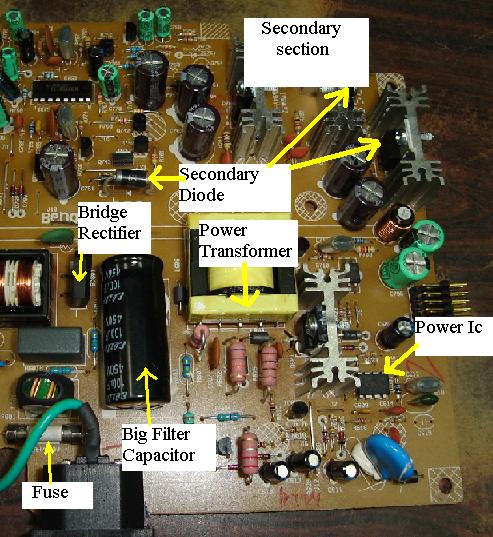
Whenever a power supply sent for repair whether it is a Monitor switching power supply or computer Atx power supply I will test the power supply first before open up the casing. Power supply problems can be categorize into no power, low output power, power supply cut-off after sometimes or once switch on, power blink and higher output voltage. Whatever the problems are I will use a standard procedure method to test it. -check the on/off switch, fuse and discharge the large filter capacitor-if the fuse burnt into dark color then expect heavy short circuit in the power supply section. It could be a shorted bridge rectifier, a shorted power transistor or even a shorted power ic. Don’t under estimate that a shorted primary winding in the switch mode power transformer can occurred. If the fuse is just a slight torn, may be the fuse spoilt by itself because fuse have lifespan too. Most of the time, replacing only the fuse will solve the no power supply symptoms.
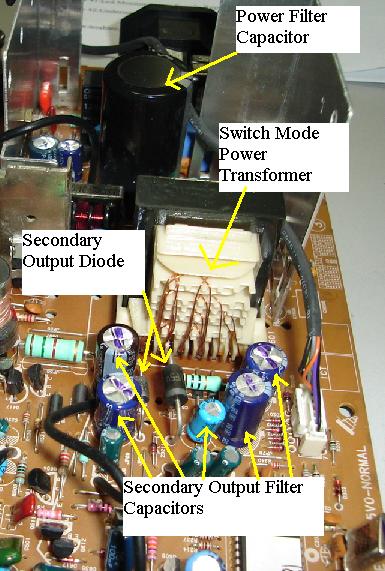
-make sure all secondary diodes are working. You can either remove one of the diodes lead to accurately check it or you can use a flyback tester as describe in this article.
-check horizontal output transistor, b+ fet and flyback transformer if you repair a Monitor. Anytime, if either one of these components have failure, it will affect the power supply functions. Testing fet and flyback transformer can be read by clicking on the blue link.
-Check all electrolytic capacitors with esr tester in the primary and secondary section- if there are some electrolytic capacitor failure in the power supply section (either primary or secondary area) the power supply will blink, produced low output power or totally no power at all!
-Test the primary winding of switch mode power transformer with flyback tester. Check also the flyback primary winding, b+ coil winding and horizontal yoke coil if you repair monitor. One of these coils shorted can cause power to shut down, blink, and no power.
Read all my articles on how to check basic electronic components. Primary side of power supply normally has about less than 30 components and it will take you less than 20 minutes to test all of them. Many times there are more than one component found to be faulty and by replacing only that particular component won’t solve the problem. Once you have completed the entire components test and already replace the necessary parts, you have to power up the power supply by using a 100 watt bulb connected across the fuse holder.
If the bulb lights very bright and won’t go off even after couples of minutes then there are still problems in the power supply. If the bulb goes dim or went off, you know that the shorts had been taken care and you now can switch on the power supply confidently and won’t blow the fuse again.
If you want to be an expert in power supply repair, one have to practice, read and fully understand how basic electronic components and power supply work. With all these knowledge in your mind and hand, I believe there will be no power supply problems that are too difficult for you to repair. All the best to you.
Please click here to become a Professsional in Switch Mode Power Supply Repair |
|
 If you have confirmed that the secondary
side of power supply components is working then what you need to do
is to desolder all the components in the primary side and test all
the components in it. This is where your real troubleshooting skill
is needed. Understanding and know how to test basic electronic
components is very important otherwise you will be facing
difficulty in finding the fault. If you are new in this electronic
repair line, I highly recommend that you check every single
component in the power supply circuit and once you got hold of it,
you can then locate fault by voltage testing or even identify fault
by section.
If you have confirmed that the secondary
side of power supply components is working then what you need to do
is to desolder all the components in the primary side and test all
the components in it. This is where your real troubleshooting skill
is needed. Understanding and know how to test basic electronic
components is very important otherwise you will be facing
difficulty in finding the fault. If you are new in this electronic
repair line, I highly recommend that you check every single
component in the power supply circuit and once you got hold of it,
you can then locate fault by voltage testing or even identify fault
by section.
Copyright@ 2006-2014-www.ElectronicRepairGuide.com All Rights Reserved