How To Accurately Test A Flyback Transformer Even Without A Flyback Tester
I believe many of us have problems especially dealing with testing of flyback transformer. You may had asked yourself this question before “how do I know if the flyback transformer is working or not”? Flyback transformer can develop many types of problems such as: 1) Internal capacitor open or shorted 2) Internal diodes shorted 3) Shorted between the primary and secondary winding 4) Arcing through the nearest ground 5) Bulged Flyback 6) Breakdown (blur) or shorted in focus and screen divider and 7) Flyback primary winding partially or fully shorted Problems in 1, 2, and 3 can be tested with a normal multimeter, for 4 and 5 you can see with your bare eyes while problem 6 you can use a monitor blur buster to solve it. Majority of us as an electronic repairer have difficulty in checking problem number 7!
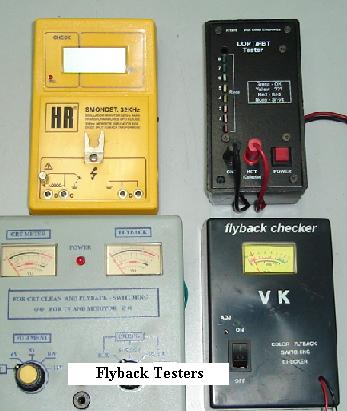
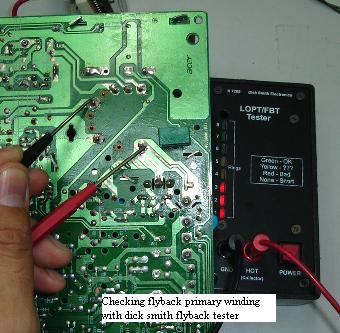
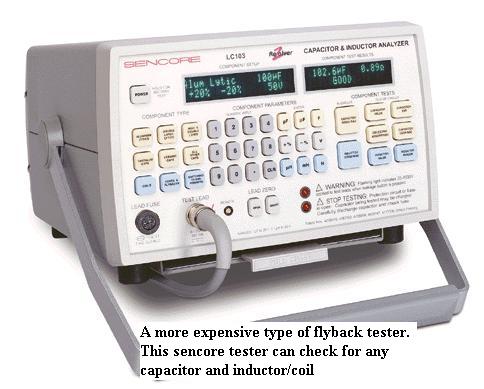
We cannot accurately test the condition of flyback primary winding with our normal analog or digital meter; in fact we need a special type of meter which is specially designed to do this job. Some techs bought the cheaper range one like the Dick Smith flyback or lopt tester while some bought the more expensive one like the Sencore LC103 capacitor and inductor analyzer to test capacitor and inductor which include checking the flyback primary winding as well. In my opinion, no matter what type of flyback testing equipment you had now, the best is still the Monitor or the TV itself. The Monitor or Television can test all the condition that I listed out from number 1 to 7.
The reason we bought the flyback tester is for general checking and we knew that it is not 100 percent accurate because some flyback transformer only breakdown when full voltage is applied to the primary winding! If the primary winding developed a full short circuit between the winding itself then it is easy to be check with our flyback tester. If it developed only a slight partial short then our flyback testers may show a good reading! This would trick us into believing the flyback primary winding is good and we will surely waste our precious time trying to find out the fault.
I had come across some flybacks that was tested good with flyback tester and yet failed when full voltage was applied. If you have a good one for comparison or replacement that would be okay but what if you don’t have one? In order to solve this type of problem, there is a simple way to find out.
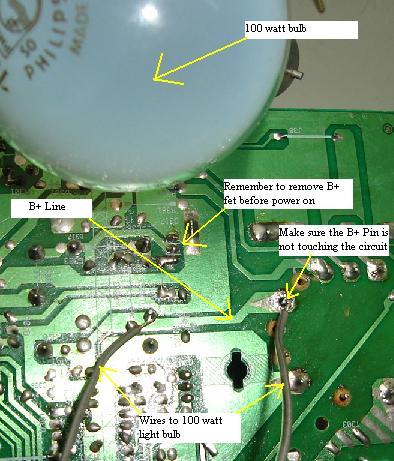
First, locate the primary winding of the flyback, you may also use a flyback tester to confirm it. Once you found the B+ pin of the flyback, desolder it and connect a 60 to 100 watt bulb between the B+ pin and the B+ line as shown in the photo. Now you have to remove the B+ fet (for boost circuit type of B+) before you switch on otherwise the fet may get hot very fast and eventually blow the fet. When you switch on the Monitor, if the bulb don’t light then the primary winding is good and if the bulb lit then we can conclude that the primary winding is shorted. This simple method can easily help you to know if the flyback primary winding is okay or not, once the winding is confirmed okay, you then can proceed to other circuit to find out why the Monitor is not working.
Conclusion- If my flyback tester confirmed that it is shorted; then indeed it is shorted and I would not use this method. However, if the tester show good reading and I’m still suspicious that the winding is the cause of Monitor to shutdown, power blink and low power, I will definetely use this method to accurately test it. There is no harm trying since to setup and test this whole circuit only takes you about less than couples of minutes. Hope you have enjoyed this article and stay tune because I will continue to send out good articles for my members once or twice per week. All the best!
|
|

Copyright@ 2006-2014-www.ElectronicRepairGuide.com All Rights Reserved